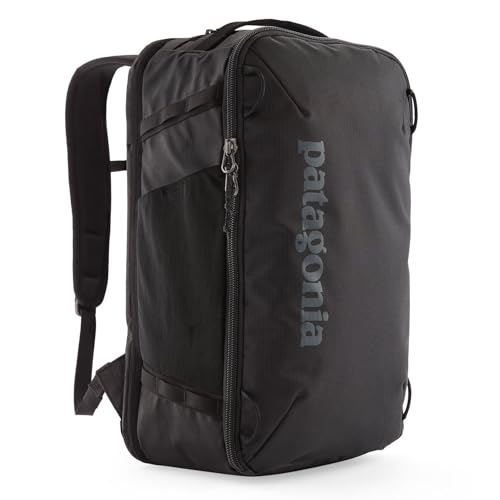
A business travel backpack has to solve two different loads: the equipment needed during the working day and the clothing that can stay at the hotel. Start with the laptop's actual closed dimensions, not its screen label, then choose an opening and organization scheme that still works when the overnight section is full.
Measure the computer, case and opening
Record the closed laptop's width, depth and thickness, then repeat the measurement with the protective case you will actually use. Compare all three numbers with the compartment's usable interior and with the narrower zipper or fold through which the computer must pass. A sleeve can be tall enough on paper and still be awkward if a curved corner, thick case or restricted opening becomes the real limit.
Screen size is a diagonal display measurement, not a chassis standard. Apple's current 13-inch MacBook Air is 11.97 × 8.46 × 0.44 inches, while the 15-inch version is 13.40 × 9.35 × 0.45 inches. Those two exact devices differ by 1.43 inches in width even though the screen labels differ by only two inches. A different maker's 15-inch computer can have another outline, so transfer the method—not Apple's measurements—to your device.
Thule publishes a 15.75 × 10.25 × 0.75-inch laptop compartment for the Aion 28L. Both cited MacBook Air bodies are smaller than those three published limits before a case is added. That numerical comparison is useful, but it is not a universal fit promise: confirm the selected bag generation, the access opening and the fully cased computer before the purchase return window closes.
Build a workday load and an overnight load
Put the laptop, charger, mouse, headset, notebook and any required adapters into a workday group. Put the shirt, base layer, toiletries and other hotel items into an overnight group. The bag should let you remove the second group without rebuilding the first; otherwise every hotel arrival and morning departure becomes a complete repack.
Do not spend compartment space on an organizer you will not maintain. A removable cable pouch can be more predictable than several built-in pockets, especially when it moves from the backpack to a meeting table. Keep dense equipment close to the back panel and check that a charger or bottle cannot press directly against the computer.
Compare two exact work-and-overnight layouts
The Thule Aion 28L starts as a 28-liter bag and expands to 32 liters. Thule lists the outside at 11 × 9.1 × 18.5 inches and 2.71 pounds, with a suitcase-style back-panel opening, a stowable TPU divider and the exact laptop-compartment dimensions above. It is the more measurable starting point when the computer fit must be resolved before clothing is considered; expansion is useful only if the larger packed outline still suits the trip.
Patagonia lists the Black Hole Mini MLC 30L at 20 × 12 × 7 inches and 2 pounds 13.5 ounces. Its separate tech area lies flat and is described as fitting most 15-inch laptops, while the main compartment keeps clothing in a different packing zone. The phrase “most 15-inch laptops” is less exact than internal dimensions, so use the Patagonia when its convertible layout suits the trip and you can independently confirm your computer rather than treating the label as proof.
Neither product is a universal winner. Choose the Aion when documented sleeve dimensions, a smaller everyday state and occasional expansion match the routine. Choose the Mini MLC when a fixed 30-liter envelope, separate tech access and backpack/shoulder/briefcase carry are more useful. Choose neither if the actual computer, case or required charger cannot enter without pressure.
Run the airport-to-meeting access drill
Pack both groups, close every expansion zipper and rehearse five actions indoors: set the bag down, remove the laptop, reach the charger, take out the overnight group and return the backpack to workday form. Note whether clothing spills into the tech path, whether the bag must lie fully open on the floor and whether the partly emptied shape remains manageable at a desk.
Repeat the sequence with the bag beneath a chair or beside a train seat if those are realistic settings. A clamshell opening is helpful for clothing but may require more floor area; a separate rear tech zipper can simplify computer access but adds structure and weight. The better layout is the one that removes friction from your repeated sequence.
Make the final check model-specific
- Match the exact product name, capacity and selected Amazon version with the manufacturer page; similar family names can conceal different compartments.
- Measure the laptop in its travel case and leave clearance rather than loading the zipper or screen edge under tension.
- Check the bag in both overnight and workday states; the larger state must suit the journey and the smaller state must suit the meeting.
- Keep airline allowance as a separate decision. A laptop fit does not establish personal-item or carry-on compliance once exterior pockets are packed.